Quizizz
This week, I created a new plant cell assessment using Quizizz. I wanted this assessment to be more like a quiz. After reading Elisabeth's blog post, I chose Quizizz because the interface seemed much more user-friendly and fun for students. Formative gives the students all of the questions at once, which did work well for making a Hyperdoc, but not so great for a quiz.
I referred to this page for help in getting started, but it was very easy to create a new quiz.


You can also add questions from other people's quizzes. Here is a screen shot of that process. I typed in "plant cell ribosomes", and a list of quizzes came up on the left. Just click on one, and the questions appear on the right. If you add a question from someone else, make sure the answer is correct! I saw some that were not.

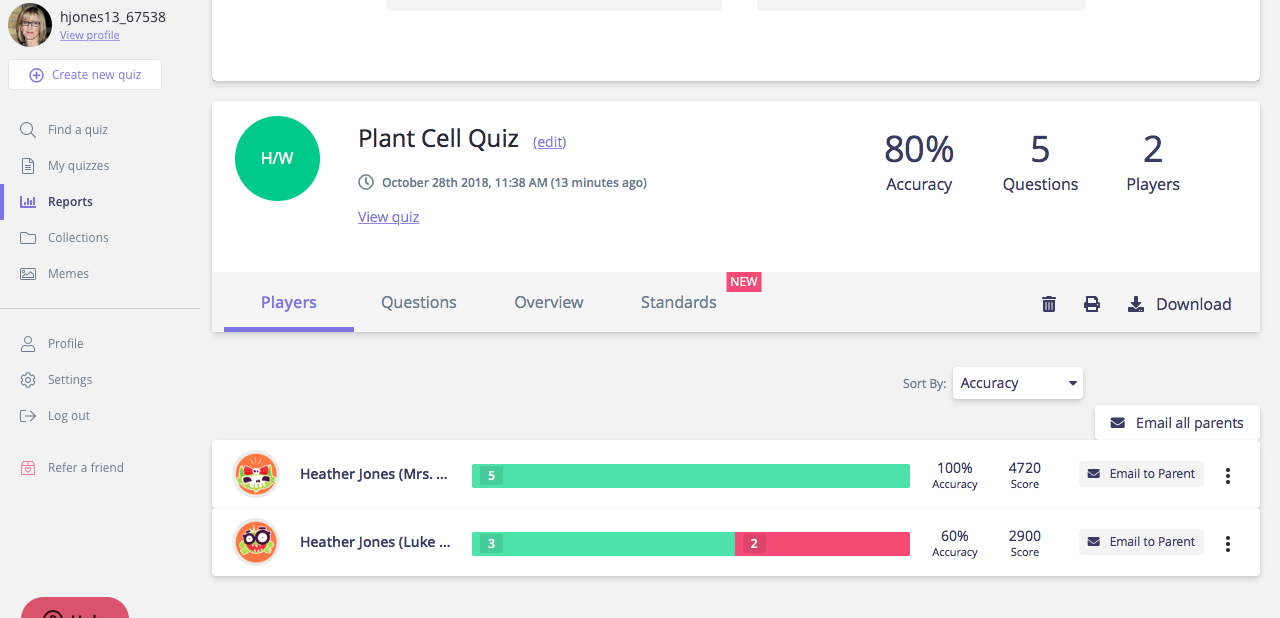
Since updating my post to create a Homework Game, I was able to do a couple test runs on the quiz and see data in the Reports section. You can see how all the questions were answered for each student, and there is a tab to see how this data aligns with standards. Here is a screen shot of the main Reports section:
Quizizz vs. Formative
I think Quizizz has a more appealing format for students, and it was a little easier to create quizzes. Formative is a lot more options for how students can answer questions, and I think Quizizz is too limited in this way. Both platforms say you can tag questions with standards, but I could only get it to fully work with Quizizz. One thing I really liked about Formative is that as kids are answering questions, I can give feedback. I do not think that is something that can be done with Quizizz. I also like the option of removing students' names with Formative. That way, a student answer can be used to show the class, but the student would not be embarrassed. I feel that this is a very important learning opportunity for students. However, after listening to the Cult of Pedagogy podcast on Retrieval Practice, I also see the value in just doing a simple quiz. Asking students to retrieve information, especially after some time has passed after the original lesson, is a very effective learning strategy. One of the things I appreciated from the podcast, is that they stressed the importance of explaining this to students. It helps them to understand their own learning, and engages their metacognition. It also has the effect of decreasing test anxiety because they understand that they are taking quizzes to learn rather than perform.
A Final Thought
I was substitute teaching this past week, and in one of the classes I was asked to give the students an assessment that involved cutting and pasting. It was an assessment that was intended to be creative, but it just became very time-consuming for students. A couple students worked on it all day. I had to give directions multiple times. Pieces were lost. The wrong things were glued. Names were not written on papers. And the teacher had to take the time to grade each paper and record the grades. I just kept thinking how much easier the whole thing would have been using technology. [I am not criticizing the teacher in any way. For some kids, this would be a fun way to take a quiz, and I definitely believe in mixing it up and doing different things.]
Sometimes it takes a while to learn new technologies, and it can be frustrating to sit and work for hours on creating one assessment. But I believe time is saved in the long run because once you learn how to use technology, you don't spend nearly as much time creating other assessments. You can save them and use them year after year. The platform grades them for you. Students don't lose things or forget to put their name on their paper. And it's a more engaging format for students to use.
~Heather
Hi Heather,
ReplyDeleteI am also playing around with Quizziz this week and found your post super helpful! I also like how you linked to Elizabeth's post, which also contains a lot of great information.
Thanks for the feedback, Robin. I think I was able to correct it.
ReplyDeleteI agree with Amanda, classmate shout outs are a cool thing to do!
ReplyDeleteThanks for making the correction...I dd better on the quiz that I thought I would and apparently better than Luke! :)
Hey Heather,
ReplyDeleteI would have done your quiz but I had no faith in myself when it came to plant cells! Thanks for letting me know about how you can change memes by the way! As I said in my reply, it really helps when someone else uses the same tool as you because they may see something you missed. I liked how you showed the differences in Quizziz and Formative. I agree that Quizziz is somewhat limited. I still think it is a great tool though
Hi Heather, I'm glad you were able to give Quizizz a try! My student enjoy it a lot and they like the competitiveness of it. The love the memes and it's fun to see them having fun!
ReplyDeleteI have to agree with you that you can't really do much other than multiple choice questions. We will have to use other tools for that.
Thank you for giving us info about the differences between Formative and Quizziz! This will help me decide what I would use next for my next formative assessment.